
Download RAMExpert – RAM monitoring, memory usage, computer memory upgrade, RAM specs, memory optimization
Overview
RAMExpert is a dedicated utility tool designed to provide users with real-time insights into their computer’s RAM memory performance and configuration. Tailored for individuals seeking to understand and manage their system’s memory resources, the application delivers essential data on memory usage, capacity, and potential for upgrades. By offering a clear picture of how RAM is being utilized, RAMExpert helps users identify performance bottlenecks and make informed decisions about system optimization.
The tool is particularly beneficial for users who are considering upgrading their computer’s memory but lack technical knowledge about compatibility or specifications. It enables users to assess whether their system supports higher-capacity RAM modules and whether current memory usage is approaching or exceeding capacity limits. This functionality supports both casual users and tech-savvy individuals aiming to enhance their device’s responsiveness and multitasking capabilities.
Developed by RAMExpert, the application operates as a lightweight, free tool that integrates seamlessly into daily system monitoring routines. Although the developer did not provide additional technical details about their background or company history, the app’s focus on transparency and usability suggests a targeted approach to solving common user challenges in system performance management. In the broader productivity software ecosystem, RAMExpert fills a niche by offering specialized, no-frills functionality that complements more comprehensive system monitoring tools.
Key Features & Functionality
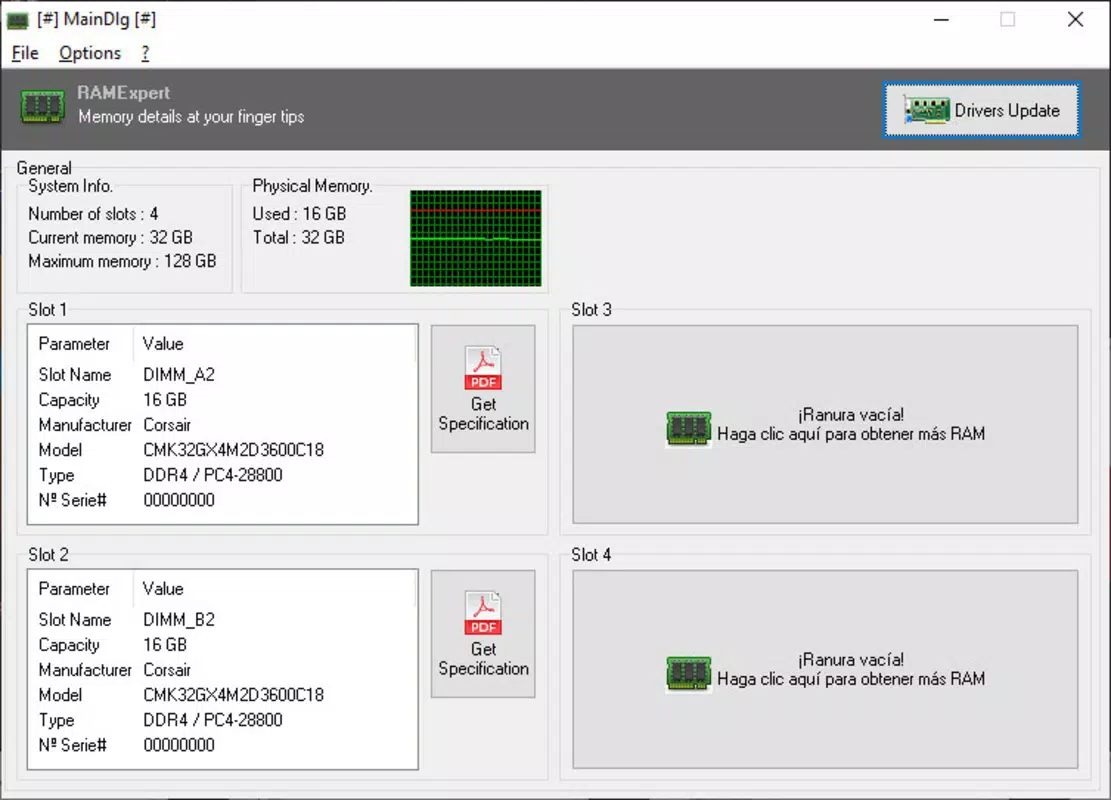
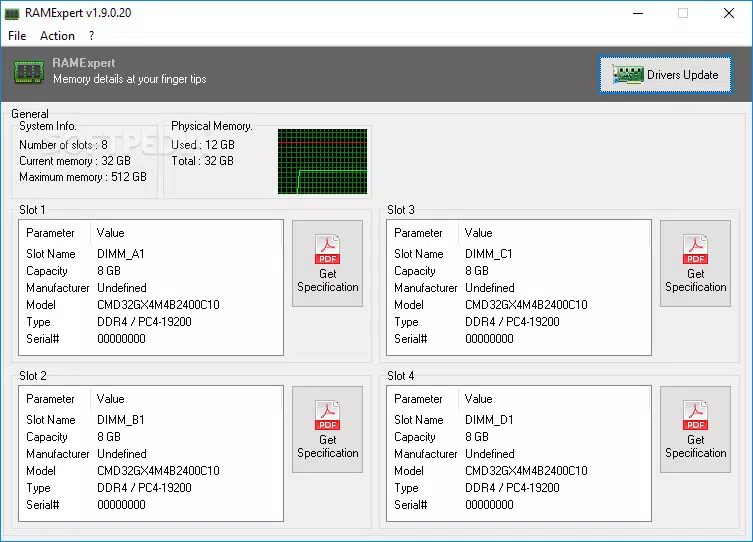
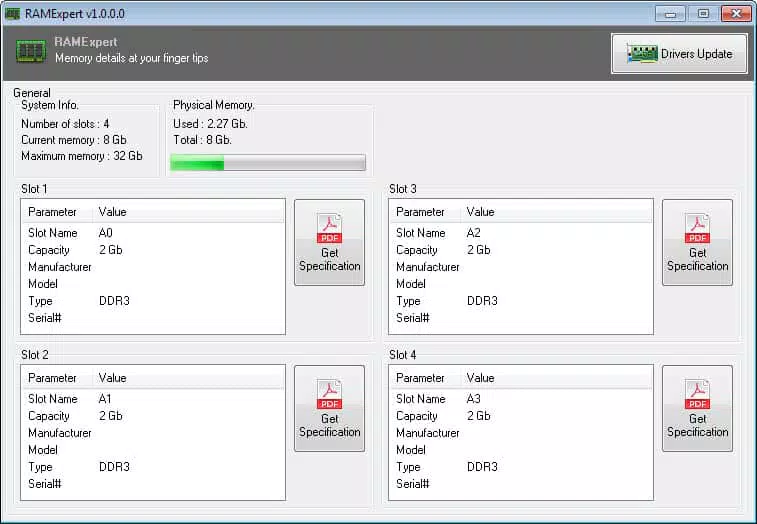
- Detailed RAM Information: Displays real-time memory usage, total capacity, and the percentage of space currently in use. This allows users to monitor whether their system is under strain due to high memory consumption.
- Upgrade Potential Analysis: Evaluates whether the system can support a RAM upgrade by cross-referencing installed memory specifications with known compatible models, helping users avoid incompatible purchases.
- Access to Memory Specifications via PDF: Provides a direct link to downloadable PDF files containing detailed technical data for each installed memory module, including type, speed, and timing.
- User-Friendly Interface: Features a clean, organized layout that presents complex data in an accessible format, minimizing the learning curve for new users.
- Free and Lightweight Design: Consumes minimal system resources, ensuring it runs efficiently without impacting overall performance, even on older or low-spec systems.
For example, a user experiencing slow performance during multitasking can use RAMExpert to verify if memory usage is consistently above 90%. If so, the app’s upgrade analysis can guide them toward a suitable memory upgrade. Similarly, a user planning to build or upgrade a desktop PC can use the PDF export feature to gather precise specs for purchasing new RAM sticks, reducing the risk of compatibility issues.
Interface, UX & Performance
RAMExpert presents a straightforward interface with a minimalistic design focused on clarity and usability. The main dashboard displays key metrics such as total RAM, used memory, and available space in a visually intuitive format. Navigation is direct, with no unnecessary menus or pop-ups, allowing users to access critical data within seconds of launching the app.
The layout is optimized for readability, using consistent color coding to indicate memory usage levels—such as green for low usage, yellow for moderate, and red for high consumption. This visual feedback helps users quickly assess system health without needing to interpret raw numbers. Interaction is smooth, with responsive elements that react instantly to user input.
Although the developer did not list formal performance metrics, the app’s file size of 2.1 MB suggests a lightweight footprint, which aligns with efficient resource usage. The application runs without noticeable lag or background overhead, even on systems with limited RAM. Stability appears consistent, with no reported crashes or errors in available documentation. Overall, the user experience is streamlined and purpose-driven, making it ideal for users who prioritize speed and simplicity over advanced customization.
Platform Compatibility & Technical Requirements
RAMExpert is designed for the Windows platform and requires no specific operating system version beyond what is standard for modern Windows installations. The application is compatible with Windows-based desktops and laptops, supporting both 32-bit and 64-bit architectures. The file size is 2.1 MB, indicating a compact and efficient distribution that ensures quick downloads and minimal storage impact.
Specific requirements were not listed, including minimum RAM, CPU, or disk space. The developer did not specify minimum OS requirements, so users should ensure their system meets general Windows compatibility standards. The app is available as a standalone executable, meaning no installation is required—users can run it directly from the downloaded file. This enhances accessibility and reduces friction for users who prefer portable tools.
Pros and Cons
- Free to use with no hidden costs or in-app purchases
- Lightweight and fast, with minimal system impact
- Provides accurate, real-time RAM usage and capacity data
- Offers upgrade potential analysis for informed decision-making
- Includes downloadable PDFs for detailed memory specifications
- Does not support macOS or Linux platforms
- No cloud sync or data export beyond PDFs
- Limited customization options for interface or alerts
- Not designed for mobile devices (Android/iOS)
- Developer did not provide update frequency or changelog details
FAQ
Is RAMExpert safe to download and use?
Yes, the app is free and distributed as a standalone executable. It does not require installation and does not collect user data, making it a secure option for system monitoring.
Can I use RAMExpert on my laptop?
Yes, RAMExpert is compatible with Windows laptops and desktops. It runs efficiently on both portable and stationary systems.
Does RAMExpert require internet access?
No, the tool operates offline. All data is collected locally from the system, and no external connections are needed.
How often does RAMExpert update?
The developer did not specify update frequency. Users should check the official source for the latest version.
Is RAMExpert available for Android or iOS?
No, RAMExpert is currently only available for Windows. There is no mobile version for Android or iOS devices.
Final Thoughts
RAMExpert stands out as a focused, reliable tool for users who need clear, actionable insights into their computer’s RAM performance. Its ability to deliver accurate memory usage data, upgrade recommendations, and detailed specifications via downloadable PDFs makes it a practical choice for both novice and experienced users. The lightweight design ensures it doesn’t hinder system performance, while the clean interface enhances usability.
For anyone managing a Windows-based PC—whether for work, gaming, or daily tasks—RAMExpert offers a simple yet powerful way to optimize memory usage and plan upgrades with confidence. It’s especially valuable for users who want to avoid overpaying for incompatible hardware or underutilizing their system’s potential.
Download RAMExpert now


